
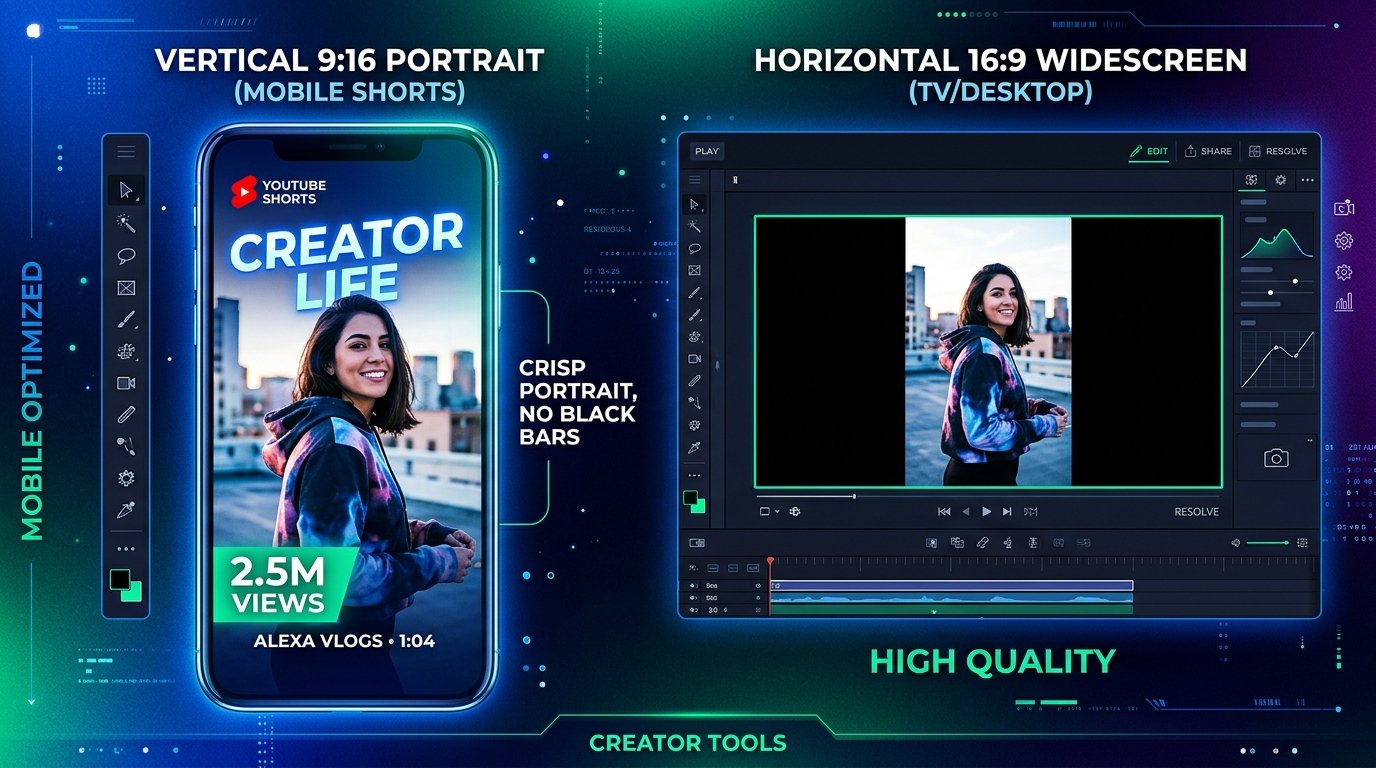
Shorts represent billions of daily views across YouTube. Whether you run a gaming channel, finance brand, or fitness hub, vertical short-form video dominates audience engagement. Yet for creators, editors, and marketers, YouTube Shorts present one of the most maddening technical hurdles on the internet: how do you actually download a clean, full-resolution 9:16 vertical cover image?
If you feed a Shorts URL into an outdated thumbnail grabber, you get a painful surprise. The tool hands you a 16:9 widescreen image where the vertical video is shrunk into the center, sandwiched between two giant black pillar bars (letterboxing). If you try to screenshot it on your phone, you get the channel avatar, sound button, like counter, and description text plastered all over your artwork.
In this complete guide, we will unpack how YouTube stores vertical video assets, why standard tools fail, and how using a specialized youtube short thumbnail downloader like YTSnapIt solves the black bar nightmare in a single click.
The Black Pillar Bar Problem: Why Generic Downloaders Fail on Shorts
To understand why you get black bars, you need to understand how YouTube's database treats Shorts behind the scenes.
Internally, YouTube treats a Short as a regular video that happens to have a vertical aspect ratio. To maintain backward compatibility with legacy TV apps, embedded blog players, and older desktop feed algorithms that only recognize standard 16:9 widescreen formats, YouTube generates a padded master file called hqdefault.jpg.
YouTube takes the 9:16 portrait video frame, centers it inside a 480×360 or 1280×720 canvas, and fills the left and right empty spaces with pure black pixels (#000000).
When you use a generic thumbnail tool that merely requests https://i.ytimg.com/vi/[ID]/hqdefault.jpg, it blindly grabs that padded 16:9 canvas. You end up with an image that looks terrible when reposted to TikTok, Instagram Reels, or Pinterest.
| Method | Aspect Ratio | Black Side Bars? | Quality / Resolution | Clutter (UI Overlays) |
|---|---|---|---|---|
| Phone Screenshot | Varies (phone screen) | No | Compressed display pixels | Heavy (Likes, Sound, Captions) |
| Generic Downloader | 16:9 horizontal | Yes (Severe letterbox) | Shrunk to center (480p) | None |
| YTSnapIt Shorts Tool | 9:16 native portrait | Zero (100% clean) | Raw CDN Master (Up to 1080p) | Zero (Master artwork only) |
Behind the Scenes: How YouTube's CDN Stores Native 9:16 Assets
So how does a true youtube short thumbnail downloader actually retrieve the unpadded vertical file?
When YouTube launched the dedicated Shorts feed, their engineering team created a specialized image endpoint on Google's CDN. Instead of relying on maxresdefault.jpg, vertical Shorts images are stored with special aspect-ratio identifiers:
oardefault.jpg: "Original Aspect Ratio Default". This is YouTube's internal designation for the raw vertical crop, rendering at 641×1139 or 720×1280 pixels without any added black borders.hq720.jpg: For Shorts uploaded with high-resolution master video files, this endpoint contains crisp high-density frames that preserve text sharpness.- WebP Dynamic Endpoints: When viewed on modern mobile apps, Google serves WebP compressed variants optimized for fast cellular loading.
YTSnapIt was built specifically to detect Shorts links (`youtube.com/shorts/[ID]`) and automatically request these native aspect-ratio endpoints. It extracts the clean 9:16 portrait canvas without requiring you to manually crop anything in Photoshop.
How to Download YouTube Shorts Thumbnails Step-by-Step
Follow these three steps to grab any Shorts vertical cover in seconds:
-
Copy the Shorts URL: In the YouTube mobile app, tap the Share arrow on the right side of the Short, then tap Copy Link. On a desktop browser, simply copy the URL from the top address bar (it will look like
youtube.com/shorts/abcdef12345). - Paste into YTSnapIt: Open YTSnapIt.com. Paste the URL into the search box. The parser immediately recognizes the Shorts format and displays the dedicated Shorts (9:16 Vertical) preview card.
- Save the 9:16 Image: Click the green Download 9:16 Image button. The pristine portrait image saves immediately to your phone's camera roll or your computer's downloads folder.
Custom Shorts Thumbnails vs Video Frame Grabs: The Mobile Catch
One of the biggest pain points for YouTube creators is how custom thumbnails work on Shorts:
Currently, YouTube allows creators to pick a specific video frame as their Shorts cover during upload via the mobile app. In select regions and on desktop studio accounts, YouTube has rolled out custom uploaded thumbnail support for Shorts.
Depending on which method the channel used:
- If the creator uploaded a custom 9:16 graphic: YTSnapIt downloads that exact graphic at maximum available resolution.
- If the creator selected a frame from the video: YTSnapIt extracts the exact uncompressed frame from the video file that YouTube assigned as the master poster image.
How to Repurpose Downloaded Shorts Thumbnails
Once you have downloaded the pristine 9:16 image using a youtube short thumbnail downloader, here is how top creators put it to work:
- TikTok Cover Consistency: Keep your brand visual style synchronized across platforms by setting the exact same cover image on TikTok and Shorts.
- Instagram Reels Grid Planning: Instagram feeds display Reels in a 1:1 square on your main profile grid and 9:16 in the Reels tab. Using the clean vertical download allows you to test how your central artwork crops in Canva before posting.
- Pinterest Idea Pins: Pinterest is a massive organic traffic engine for vertical content. Re-pinning your YouTube Short with the clean 9:16 thumbnail can drive thousands of evergreen views back to your channel.
Summary & Final Thoughts
Vertical video is here to stay, and low-res screenshots or letterboxed black bars should never hold back your content workflow. By using a browser-based, purpose-built youtube short thumbnail downloader like YTSnapIt, you ensure that every Shorts cover you grab is uncompressed, perfectly proportioned in 9:16, and ready for whatever creative project you tackle next.