
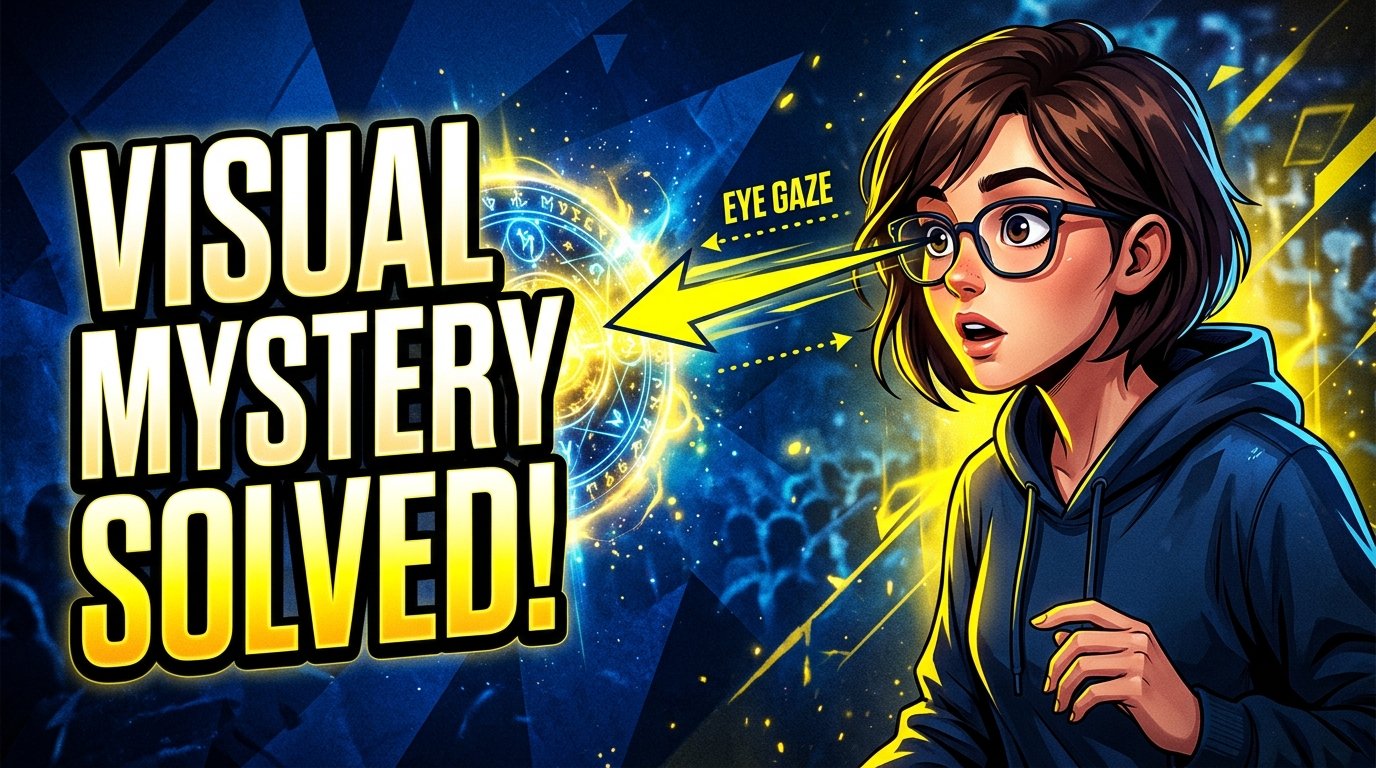
Every single day, the average YouTube user scrolls past hundreds of video thumbnails across their homepage feed and suggested video sidebar. You have exactly 0.4 seconds of visual processing time to disrupt that thumb scroll.
Designers who treat thumbnails like movie posters or magazine covers almost always fail. Why? Because movie posters are meant to be viewed on 6-foot billboards; YouTube thumbnails are consumed as tiny 1-inch cards on handheld mobile devices surrounded by fierce competition.
Here are the 7 scientifically grounded visual psychology rules that drive high Click-Through Rates across top YouTube niches in 2026.
1. The Gaze Cue Principle (Never Look Straight at the Camera)
Evolution has hardwired human beings to follow another person's eye gaze. If someone on a busy street suddenly stops and stares up at the sky, everyone walking past will instinctively look up too.
In thumbnail design, when your subject stares directly forward into the camera lens with a generic smile, it communicates: "This is a selfie." It triggers passive recognition, but zero curiosity.
The High CTR Fix: Have your subject look intensely at the object of curiosity—the broken engine, the controversial graph, the mysterious box, or the opposing subject. When viewers see the face, their eyes instinctively follow the gaze line across the thumbnail canvas directly to the mystery focal point.
2. The "3-Element Rule" (Eliminate Visual Clutter)
Cognitive overload kills CTR. When a thumbnail contains a face, a logo, two screenshots, a giant arrow, three lines of text, and a starburst badge, the viewer's brain cannot synthesize the story in 0.4 seconds. They swipe right past it.
Every world-class thumbnail consists of maximum three focal elements:
- Element 1: The Subject (Human face with clear emotion OR the hero product).
- Element 2: The Context / Catalyst (What happened? The broken car, the mansion, the courtroom).
- Element 3: The Hook (A 2–3 word phrase OR a high-contrast visual contrast like Before vs. After).
3. The Curiosity Gap (The Title & Thumbnail Two-Step)
Never repeat your video title inside the thumbnail. If your title is: "Why Electric Cars Lose 30% Range in Winter", having thumbnail text that reads "Electric Cars Lose Winter Range" is completely redundant.
Instead, treat the title and thumbnail as a collaborative puzzle. One presents the premise; the other triggers the curiosity gap:
- Title: "Why Electric Cars Lose 30% Range in Winter" (Gives clarity and search relevance).
- Thumbnail: Close-up of a battery gauge showing
-14°Fwith text: "I Had No Idea..." (Triggers emotional intrigue).
4. Contrast Ratios for YouTube's Dark Mode Feed
Over 65% of active YouTube users now browse in Dark Mode (where the app background is pure
charcoal #0F0F0F).
Thumbnails with dark grey backgrounds, muddy brown palettes, or deep navy gradients blend directly into the dark mode UI, causing the borders to disappear completely.
- Use Complementary Color Pairs: Warm, energetic foreground elements (high-saturation yellow, safety orange, crisp white) paired with cool, clean backgrounds (deep cobalt blue or clean cyan).
- Rim Lighting (Hair Lights): In Photoshop, use a subtle inner glow or soft brush to paint a high-key edge rim light along your subject's silhouette. This separates the cutout from dark backgrounds with crisp definition.
5. The 3-Word Limit for Typography
If your thumbnail requires more than 4 words of text to make sense, your visual storytelling has failed.
| Weak / Cluttered Text | High-CTR Punchy Text | Psychological Impact |
|---|---|---|
| "Top 10 Productivity Tips For 2026" | "NEVER DO THIS." | Loss aversion triggers immediate focus. |
| "How I Learned Python In 3 Months" | "IT WORKED?!" | Skepticism and validation hook. |
| "Is The iPhone 16 Pro Worth Buying?" | "BIG MISTAKE." | Direct warning provokes confirmation bias. |
Font Choices: Use bold, condensed sans-serif typefaces like Bebas Neue, Montserrat ExtraBold, Impact, or Anton. Avoid thin, cursive, or serif fonts that break down at mobile scale.
6. Micro-Expressions Over Cartoonish "YouTube Face"
Between 2018 and 2022, extreme wide-open-mouth thumbnails ("Soy Face") dominated YouTube. Today, viewer fatigue has set in. Discerning audiences in US, UK, and European markets increasingly associate cartoonish, fake-gasping thumbnails with low-effort spam.
Modern high-performing creators have shifted toward authentic micro-expressions:
- Intense skepticism: A raised eyebrow, tilted chin, and narrowed gaze.
- Genuine awe or relief: Real emotion captured from an actual video frame rather than a staged photo booth session.
- Deadpan seriousness: A calm, solemn expression contrasting with a wild or unexpected background situation.
7. The 2-Foot Squint Test (The Universal Validator)
Always validate your design before uploading. Open your artwork in Photoshop, Canva, or Figma, zoom out to 10% magnification, and lean back 2 feet from your screen.
If your focal point doesn't pop in less than half a second, remove 20% of the graphic noise and boost the brightness contrast on your subject by 15%.
8. The Title-Thumbnail Synergy Rule: Never Repeat Words
The title and thumbnail are not two separate entities; they are halves of a single psychological equation. The most common amateur mistake is repeating the exact video title inside the thumbnail text.
If your video title is "How I Built a $10,000/Month Business in 90 Days", putting the words "$10,000/Month Business" on your thumbnail wastes half your cognitive selling opportunity.
Instead, use the thumbnail to introduce an intriguing visual riddle or emotional reaction, and let the title provide the logical explanation:
- Thumbnail Text: "Was it luck?" or "Step 3 Changed Everything".
- Video Title: "How I Built a $10,000/Month Business in 90 Days".
The thumbnail creates the emotional curiosity itch, and the title promises the specific, tangible reward for scratching it. When the two elements harmonize without redundancy, CTR surges by 30% to 50%.
Inspect What Top Creators Are Doing Right Now
Use YTSnapIt to extract full-resolution 1280×720 thumbnails from the trending page in your niche. Study their color palettes, typography, and edge lighting up close.
Launch YTSnapIt Inspector